Memory Shortage 2025–2026: Causes, Impact, and How to Build a PC
Case & Components
Overwhelming AI-industry demand for memory has been adversely impacting PC RAM pricing for several weeks, resulting in rapid price inflation. This means that upgraders and builders now have to think far more carefully about what sweet-spot RAM kit they intend to purchase to upgrade or build their PC systems.
Below, we will examine more closely what caused the current situation, and what impacts we are seeing upon PC gamers and content creators. Some of you may be looking to DIY a budget PC build with limited memory, or be looking for guidance on being prudent with your high-performance PC memory options. At either extreme and in-between, we provide a comprehensive guide to navigating RAM shortages while building a modern PC to satisfy your needs.
It isn’t all doom and gloom, though. While we face the worst DDR4 and DDR5 shortage we have ever seen, there are some PC components that are cheaper than ever at this time. This means, if you are happy to build or upgrade in phases, there are excellent CPU, GPU, and monitor bargains to be had.
On the other hand, for those who like solutions neatly packaged, we’ve put together specifications for three optimal DIY PC system builds targeting three distinct budgets and groups of users during the RAM shortage.
Lastly, you can’t download more RAM, of course, but we outline how to tune your system with MSI’s BIOS memory performance enhancement features. These enhanced MSI-designed features can deliver double-digit performance gains from the memory you already have installed.
Where we are with pricing
PC memory kit prices have soared in recent months. If you check price tracking websites like PCPartPicker, CamelCamelCamel, and others, it is clear to see the rocket fuse for modern DDR5 pricing was lit in late September and, at the time of writing, there’s been no letup in its stratospheric climb.
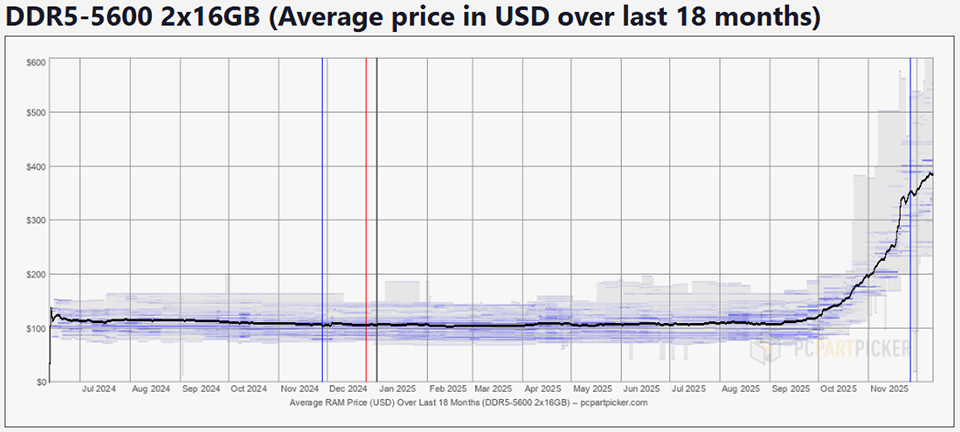
**This chart is referenced from data available on PCPartPicker and is based on the memory price trends shown on the following website: https://pcpartpicker.com/trends/price/memory/
A typical example, to illustrate our point, is the Kingston FURY Beast 64GB DDR5-6000 CL36 Desktop Memory kit. This desirable 2x 32GB kit is currently priced at $629.99 on Amazon.com, but was available for just $229.99 at the same retailer, until October.
How we got here
DRAM is a commodity product, which makes it relatively simple for the big-three producers of memory chips to reallocate production capacity to more profitable lines.
What we are seeing now, is DRAM-based products which are favored by AI data centers, like HBM, diverting capacity away from PC DDR4 / DDR5, and thus creating scarcity. Then a fundamental of economics kicks in, the law of supply and demand, driving PC RAM prices higher, and higher. Micron’s recent decision to abandon the consumer market is only expected to make things worse next year.
Commodity capacity crunch implications
32GB RAM was on track to become the new normal for gaming PCs as recently as September, according to Steam Survey chart extrapolation.
Now it is reasonable to expect the era of the 32GB system RAM PC meta to be delayed, and builds with 64GB to remain a niche luxury (<5%).
PC gamers and creators feel the pain
Having more system RAM isn’t just a luxury. Gaming industry leaders have already begun to highlight that RAM price increases will be “a real problem for high-end gaming for several years.”
Of course, those using their PCs for professional and creative pursuits will also want to configure their systems with more RAM. For such users, a lack of RAM can interrupt or delay work - and time is money.
Can you wait for PC RAM prices to return to ‘normal’?
This is a difficult question, as no one knows whether the price for PC system RAM has peaked, or will do so soon. All the contributors to the price rises we have seen could continue piling upward pressure on PC RAM pricing, but there are limits to pricing elasticity. Everyone has limits.
With this uncertainty ahead, those planning PC builds or purchases in the next few months are advised to strategize. Key points to consider will be whether to go for a PC upgrade or new build, to carefully predict the ideal system RAM configuration for your work and play, and whether you can build or buy a PC which can receive incremental RAM upgrades.
Building or upgrading a PC during a RAM shortage
Your PC’s purpose and RAM capacity
A pragmatic approach to configuring an upgrade, new build, or complete new PC purchase would put the following considerations at the forefront:
- The essential tasks your refreshed, or new, PC will be used for.
- The acceptable levels of RAM and other system resources (like CPU, GPU, screen area, and storage) that will make the upgrade worthwhile.
That's a purposefully short list, so you should check it again! Making sure you don’t skimp on anything, within budget, is essential to optimizing your PC.
We have a lot more to say about the PC’s RAM configuration, though. Please consider the following breakdown carefully to help you narrow down a RAM configuration goal:
For gamers: To be able to play new and upcoming AAA games without poor 1% lows, which precipitate unpleasant stutters, 32GB of memory is the minimum target in 2025/26. A memory upgrade for a gaming PC should be enough to handle not only the game engine, but a handful of background tasks like video capture, streaming software, and chat apps.
For creators: If content creation is going to be a primary use of your PC system, we’d recommend aiming for a 64GB RAM configuration from the outset, for anything more than hobbyist-level work. Modern 4K+ video, multi-track media projects, and 3D workflows, will nearly all benefit from the extra RAM. You don’t want to have a memory constrained PC impact your work schedule or profitability.
Technical considerations - memory type, channels, frequency, and timing
Narrowing down your RAM capacity needs, using the above task-driven guidance, is a great first step on your path to RAM nirvana. But now you know how much RAM you need, it is vital to choose the optimal specifications for this upgrade or new build project.
Upgraders have it relatively easy here. Those with, say, 16GB of RAM already installed and aiming to double up will often be able to check what memory is already installed and just buy more of the same. That depends on whether your motherboard has vacant memory slots, though. If not, it might be necessary to throw out the old low-capacity RAM sticks to upgrade. But it is a good time to sell off old, unwanted RAM, to recoup some costs.
Memory type: This is a simple decision. Modern desktop PC systems will use either DDR4 or DDR5 RAM sticks. Choose the right type, as per your motherboard manual.
Upgraders will already have the decision about memory type ‘set in stone.’ Those with existing DDR4 motherboards might be happy about the current balance in the DDR5 vs DDR4 shortage. But new build and new PC buyers would be advised to opt for the newer, faster DDR5 standard to ensure they have the best RAM for their PC build, and platform longevity.
Memory channels: For optimal performance, for both DDR4 and DDR5 systems, you should install memory modules in matched pairs. Doing so delivers bandwidth and overall performance benefits.
Extreme PC overclockers and tuning enthusiasts will also prefer two-stick memory configurations, even when a motherboard has four slots. Yet, mainstream users don’t need to worry about highly marginal performance gains that give overclockers sleepless nights. Nevertheless, it is true that configuring your ideal RAM capacity using just two slots on a four slot motherboard will provide the smoothest upgrade path at a later date.
We’d recommend people only opt for a single-stick RAM configuration if their cash-flow is really tight, but will be sufficient to add another identical stick in the not too-distant future - to enable dual-channel mode.
Memory frequency and timings: PC retailers usually sell kits with the memory frequency designations very clearly placed in the product name or description. Thus, you may be faced with a choice between a 32GB DDR5-6000 kit and a 32GB DDR5-6400 kit. While you might feel a gravitational pull towards the ‘faster’ kit here, unfortunately, there’s a lesser publicized CAS Latency (CL) specification that is also very important to ensuring the best RAM for a PC build.
Buyers will have to juggle a complex array of frequency, latency, and cost considerations to make the optimal product choice here. Aim for higher frequencies with lower CL numbers within your budget. The mid-2025 price / performance sweet spot was DDR5 with a transfer frequency indicator between 6000 and 6400, and a CL rating between 30 and 36. Those are good brackets to stay within, depending on pricing. Choose EXPO kits for AMD systems, and XMP kits for Intel systems, if you see this additional option listed.
">from DDR5-5600 (CL36) to DDR5-8000 (CL38) and many in between. The tests shine a light on the kinds of tradeoffs that are involved in memory kit frequency/timing decisions and are a great resource for selecting high-performance PC memory options.
PC system balance - prioritize CPU or GPU spending now?
Unfortunately, we can’t definitively predict RAM pricing movements over the coming months. You must do your own research to determine whether to lock in at the current prices, aiming to buy before further rises, or hold off, hoping for the DDR4 and DDR5 shortage to come to an end. With luck, we have just observed a peak, and prices will have drifted lower by the time you read this.
If you can bide your time, some other essential PC components are at the best prices they have been for a long time - CPUs, GPUs, monitors, cases, and coolers are all great buys now for PC upgraders and builders. Sub-MSRP pricing is a particularly rare occurrence in the GPU market. Thus, if you are upgrading or putting together a new system at a measured pace, these ‘cheap’ key components may be the choicest products to splash your budget on now.
Our recommended builds during the current memory shortage
We’ve put some recommended build suggestions together for those of you in the market for a new PC right now. A few months prior, we might have easily doubled some of these memory kit recommendations - and kept the budget low. Nevertheless, these builds offer carefully balanced configurations across three target segments, and shouldn’t have you suffering from RAM-anxiety.
Spec/System
Budget gamer and everyday PC user
Mid-range gaming streamer and prosumer content creation
High-end enthusiast gaming, streaming, and high-res media creation
RAM
16GB (2x8GB) – 32GB (2x16GB) DDR5-5600 (depending on availability and budget)
32GB (2x16GB) DDR5-6000, upgradeable to 64GB (4x16GB/2x32GB) or above
A 32GB (2x16GB) DDR5-6000 kit is ideal for gaming and general use, upgrade to 64GB (4x16GB or 2x32GB) if content creation tasks require it
CPU
Intel Core Ultra 5 245K / AMD Ryzen 5 9600X
AMD Ryzen 7 9700X / Intel Core Ultra Processor
AMD Ryzen 7 9800X3D. The gaming sweet spot!
Motherboard
GPU
SSD
1TB SSD
2TB PCIe Gen4 NVMe
2TB PCIe Gen4 NVMe +
In summary, these systems don’t scrimp on required RAM, but may be less ‘future-proof.’ With the cyclical boom / bust nature of the memory market, though, we’d expect users to be able to upgrade RAM for a fair price within the useful service life of these systems.
We’ve specified what we consider the minimum storage amounts we would start with for these systems. However, you will have a good idea of your current / most played games library size. Those working on high-end high-resolution content creation projects will very likely benefit from additional fast PCIe storage and external storage for backups and transfers, plus the higher quota RAM recommendations.
MSI’s BIOS memory performance enhancement features can squeeze more performance from the memory you have
Sadly, there is still no way to download more RAM, even in the Web 3.0 age! In the real world, you just have to work harder, and smarter, with the resources you have available. MSI’s BIOS memory performance enhancement features are easy-to-use settings, available in many of our modern performance motherboards.
With just a few adjustments, users can fine‑tune their memory configuration for smoother, faster operation. In fact, these optimizations can deliver performance gains into the double‑digit percentage range. Thus, even if you think you’ve already got the best RAM for the PC build of your dreams, it is worth diving into these settings.
Memory Try It!
MSI’s BIOS memory performance enhancement features works on three levels to enhance your existing memory’s capabilities. Both AMD and Intel platform users will be able to enjoy RAM performance gains using our Memory Try it! features. This set of optimizations works with most common memory modules, providing multiple combinations of memory frequencies and parameters. Think of Memory Try it! as a great set-it-and-forget-it pathways to the best memory settings, with a minimum of fuss.

AMD High-Efficiency Mode & Intel Memory Extension Mode.
MSI caters for more advanced memory tweakers, too, with BIOS adjustments to quickly tune and optimize DRAM timings.
On AMD platforms, this section of our BIOS features come under the heading of High-Efficiency Mode. On Intel systems, these BIOS settings are made through the Memory Extension Mode.
If you are using one of our AMD motherboards you will have five settings to toggle between here: Auto, Tightest, Tighter, Balance, and Relax. Tighter settings on the spectrum are preferable, but stable operation using the tighter settings depends on the quality of your memory.
On Intel systems, the Memory Extension Mode can be accessed to make similar DRAM timing adjustments. This mode is a little more nuanced than the AMD one, but basically, you can choose from: Disabled (no MSI optimizations), Performance Mode (for balanced everyday use), Benchmark Mode (aggressive timings), Memtest Mode (prioritizing stability), and High-Efficiency Mode (low-latency, improved bandwidth).
Whether using AMD or Intel adjustments, a trial-and-error approach needs to be used for the best DRAM tuning results for your particular system and PC usage patterns.
AMD memory tweaking example
For an example of how MSI labs optimized an AMD Ryzen 9 9950X3D-based PC system, please follow the link. We used the latest BIOS and chipset software at the time to deliver significant gaming performance uplifts via memory tuing in the BIOS - for free.